RowCheck Trial — Offline CSV Comparison
A downloadable tool for Windows
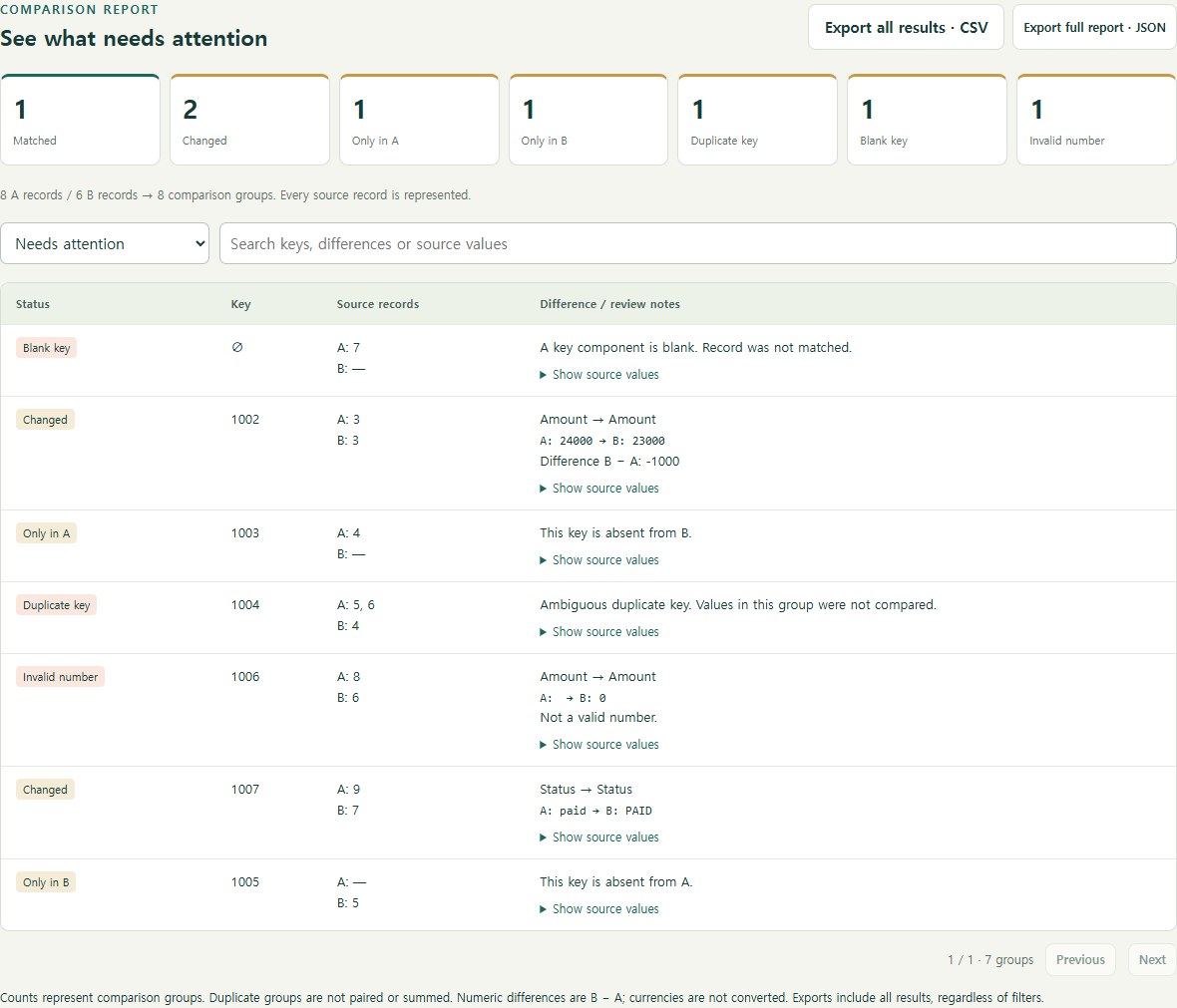
Two exports. One clear review list.
Compare order, shipment or payment CSVs without uploading your files. RowCheck runs locally in Microsoft Edge on Windows. No installation, account or internet connection is needed to use the downloaded tool.
Free Trial: up to 500 records per file
- Find records present in only one file.
- Flag duplicate or blank IDs instead of guessing a match.
- Compare amounts exactly up to six decimal places, with an optional tolerance.
- Compare text fields such as status or names.
- Review original values and source record numbers.
- Export complete CSV and JSON reports; save reusable column mappings.
The Trial includes all comparison and export features, has no expiry timer and accepts up to 500 data records per file. Limits: 20 MiB per file, 200 columns, up to three key columns and ten value comparisons.
Start in three steps
- Download and extract the ZIP.
- Open RowCheck-Trial.html in Microsoft Edge.
- Choose English at the top right, then click Explore the sample or select two CSV files.
The interface and guides support English and Korean. CSV/TSV import supports UTF-8, EUC-KR/CP949 and UTF-16.
Check the fit
CSV/TSV only: no direct XLSX or PDF import, fuzzy matching, currency conversion or many-to-one settlement reconciliation. Compare amounts in the same currency or unit. Duplicate groups are not automatically paired or summed. Blank amounts are not treated as zero.
Tested on Windows / Microsoft Edge. This is a review aid, not a replacement for checking your records. Screenshots use fictional sample data. The tool and accompanying text were created with generative AI and tested with automated checks.
Feedback
Use the comments below for questions or reproducible issues. Describe the format with made-up examples rather than posting customer data.
한국어 안내
ZIP을 풀고 RowCheck-Trial.html을 Edge에서 여세요. 예제로 먼저 살펴보기를 누르거나 두 CSV를 선택하면 됩니다. 파일당 500개 레코드까지 무료로 비교하고 보고서를 저장할 수 있습니다. 파일은 서버로 전송되지 않습니다. 한국어 사용 안내가 ZIP에 포함돼 있습니다.
Download
Install instructions
Extract the ZIP, then open RowCheck-Trial.html in Microsoft Edge on Windows. No installation or internet connection is required. Choose English at the top right if needed. Start with Explore the sample. Read START-HERE-EN.md or START-HERE-KO.md for supported formats and limits.
Leave a comment
Log in with itch.io to leave a comment.